My Azure experience up to this point had been pretty surface-level — deploying apps, writing the odd Bicep template, poking around with services like Storage and the occasional Container App. I hadn’t really touched the integration side of things. API Management (APIM) was one of those services I’d seen in the portal plenty of times but never had a reason to actually use.
So I did what I usually do when I want to actually understand a technology: I picked a real-world scenario and built a proof of concept that forced me to use it properly.
The result was an end-to-end system that:
- Exposes Azure Functions as managed API endpoints
- Implements both synchronous and asynchronous patterns
- Uses a message queue to handle background work
- Fronts a real internal system (Jira)
- Exposes an MCP endpoint via APIM
- Powers a Copilot Studio agent that can create and check Jira tickets
- Is monitored through Application Insights
It was a POC. Nothing production-hardened. But it taught me more about Azure integration patterns in a few weeks than any tutorial had in years.
The stack at a glance
- Azure Functions — four HTTP endpoints plus a queue-triggered worker
- Azure Storage Queue — background work for async ticket creation
- Azure API Management (Developer tier) — gateway, policies, developer portal, MCP endpoint
- Application Insights — end-to-end monitoring
- Microsoft Copilot Studio — the agent that consumes the MCP endpoint
- Jira — the internal system being fronted
Why APIM?
Azure API Management is one of those services that looks straightforward on the surface but has a lot of depth once you get into it. At a high level, it’s a gateway that sits in front of your APIs and gives you:
- A single entry point for consumers
- Policy-driven request/response transformation
- Authentication and authorisation handling
- Rate limiting and quotas
- A developer portal for API discovery
- Built-in monitoring and analytics
What I wanted to understand was how it fits into a real architecture — not just “add APIM in front of an API” but what it actually unlocks when you use it properly.
Jira was the obvious backend to pick. It’s an internal system that most teams interact with daily, and wrapping it in a managed API layer is a genuinely common pattern. It also gave me a reason to think about authentication, abstraction, and what “exposing an internal system” actually means in practice.
The Architecture
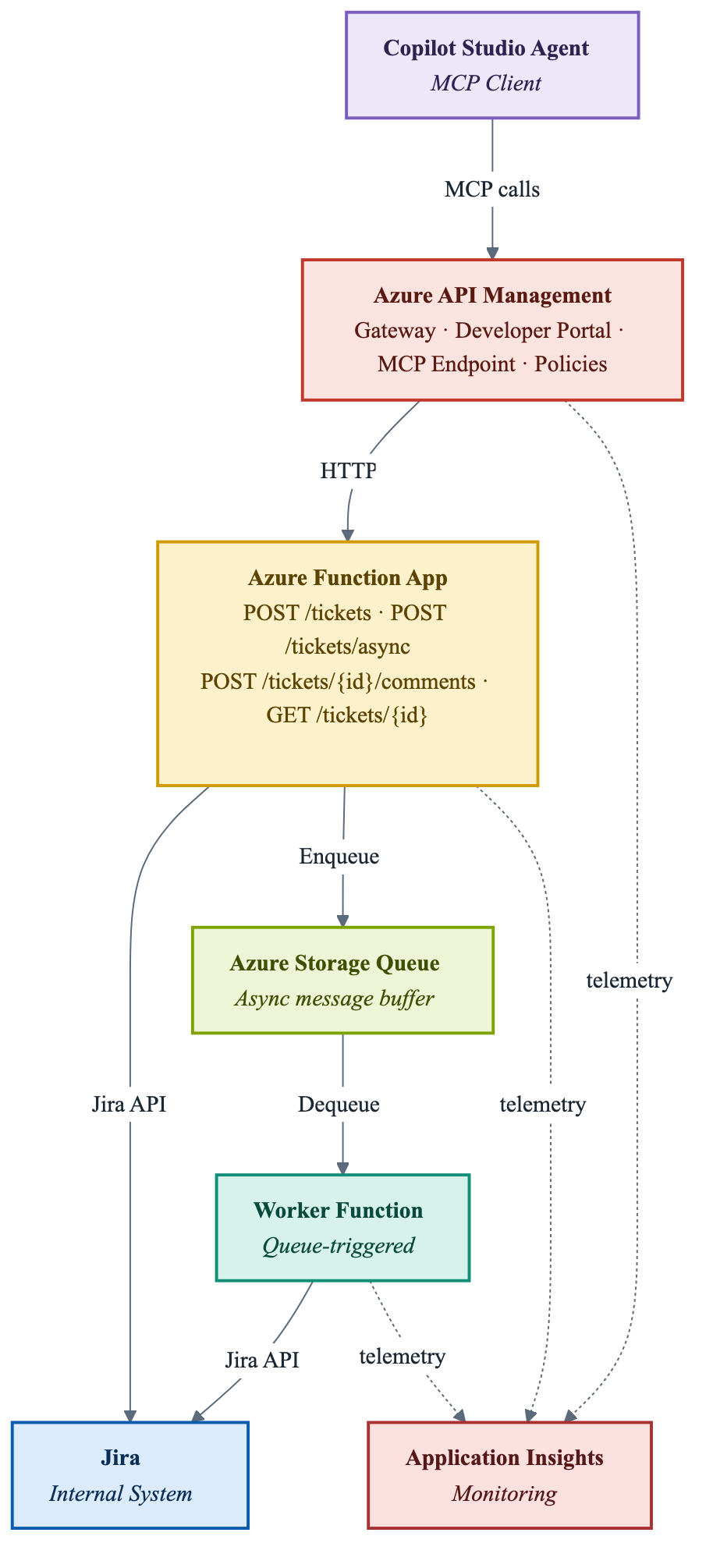
Here’s what I ended up building:

Every external call goes through APIM. The Function App handles the actual Jira API calls. For async ticket creation, messages land in an Azure Storage Queue and a queue-triggered worker function processes them in the background. The four endpoints are:
POST /tickets— create a ticket synchronouslyPOST /tickets/async— queue a ticket for background creationPOST /tickets/{id}/comments— add a comment to an existing ticketGET /tickets/{id}— get the details of a ticket
The Function App: Four Endpoints Over Jira
I built four endpoints inside a single Azure Functions app. Each one wraps the Jira REST API, but the abstraction buys something: callers don’t need to know Jira’s API shape, authentication scheme, or field structure. They call a clean, documented endpoint and get a clean response.
Create Ticket (Sync)
The straightforward one. Caller sends a payload with a summary, description, and issue type. The function calls Jira synchronously and returns the created ticket ID.
POST /tickets{ "summary": "Something is broken", "description": "Details...", "issueType": "Bug"}→ { "ticketId": "PROJ-123" }
Clean, predictable, easy to test.
Create Ticket (Async)
This is where it got interesting.
Sometimes you don’t want the caller to wait for Jira. Jira can be slow. External calls fail. If you’re building something that creates a lot of tickets, you don’t want the caller sitting there for 3 seconds per ticket.
The async endpoint accepts the same payload but immediately returns a 202 Accepted with a correlation ID:
POST /tickets/async→ 202 Accepted { "correlationId": "abc-123", "status": "queued" }
Behind the scenes, the function drops a message onto an Azure Storage Queue. A separate queue-triggered worker function picks it up, creates the Jira ticket, and logs the result. For this POC the correlation ID mostly served as a tracing handle in Application Insights — I didn’t build a status-lookup endpoint keyed on it. In a production system you’d add one (or push a webhook callback) so the caller can find out what happened. More on that gap later.
This pattern — accept-and-queue rather than process-and-return — is one of those things that sounds obvious but feels genuinely different once you’ve implemented it. It forces you to think about what “done” means to the caller versus the system.
Add a Comment
Straightforward. Takes a ticket ID and comment body, posts it to Jira, returns the comment ID.
POST /tickets/{id}/comments{ "body": "Following up on this..." }
Get Ticket Details
Also straightforward. Calls the Jira API and returns a normalised response — not the raw Jira payload, which is enormous and messy, but a clean summary of the fields I actually care about.
GET /tickets/{id}→ { "id": "PROJ-123", "summary": "Something is broken", "status": "In Progress", "assignee": "Jamie", "comments": [...] }
The abstraction here is underrated. If you’ve ever dealt with the raw Jira API response, you know how much noise there is. The function strips that down to something callers can actually use.
The Async Pattern: Queues and Workers
The queue-based async pattern deserves its own section because it’s worth understanding properly.

Azure Storage Queues are simple, cheap, and built into the Azure ecosystem. A message goes in, a trigger picks it up, work gets done. What I found compelling about wiring this into Azure Functions is how naturally the queue trigger fits:
- The worker function only runs when there’s work to do
- Azure handles the retry logic — if the worker fails, the message goes back on the queue
- Dead-letter handling (poison queue) is built in
- You get visibility into queue depth through Azure Monitor
For this POC, I had a single worker function watching the queue. When a message arrived, it:
- Deserialised the ticket payload
- Called the Jira API to create the ticket
- Logged the result (ticket ID or error) to Application Insights
- Completed (or failed) the message
In production you’d probably want to update a status store so callers can check progress. I kept it simple here — the point was to understand the pattern, not build a complete implementation.
One thing this POC clarified for me: async patterns move complexity from latency to state management. The caller gets a fast response. But now the system needs to track what happened to that request. There’s no free lunch — just a trade-off worth making deliberately.
Setting Up APIM
Once the Function App was working, I put APIM in front of it.
The setup flow is roughly:
- Create an APIM instance (I used the Developer tier for cost reasons)
- Import the API — you can point APIM at a Function App directly and it pulls the endpoint definitions
- Configure policies
- Set up the developer portal
Policies
This is where APIM earns its keep. Policies are XML-based rules that run on requests and responses. You can use them to:
- Transform headers
- Validate request payloads
- Set rate limits
- Inject authentication headers before passing requests to the backend
- Rewrite URLs
- Add CORS headers
For this POC I kept policies simple — mostly header manipulation and some basic validation. But just going through the process of writing policies made the abstraction click. APIM isn’t just a proxy. It’s a programmable layer that can own a significant amount of cross-cutting logic so your backend functions don’t have to.
Developer Portal
APIM includes a developer portal — a self-hosted website where consumers can browse APIs, read documentation, and get API keys.
Getting this set up was one of those things that takes longer than expected but pays off. Having a browsable, documented API surface is a different experience from sharing a Postman collection or pointing someone at a README. It feels professional. More importantly, it’s the kind of thing that matters when you’re abstracting internal systems — a developer portal means consumers don’t need access to Jira, don’t need to understand Jira’s API, and don’t need to be involved in credential management.
Exposing an MCP Endpoint
This was the part of the POC I was most curious about.
As of early 2026, Azure APIM has native support for exposing an MCP (Model Context Protocol) endpoint — a standardised way for AI models and agents to discover and call tools. Once you set it up, any MCP-compatible client can browse your API’s operations and invoke them as tools.
Configuring this in APIM was surprisingly low-friction. The key steps:
- Enable the MCP feature on the APIM instance
- Select which API operations to expose as tools
- Configure the MCP endpoint URL
Once that was done, I had an MCP-compatible endpoint sitting on top of my four Jira functions. The next step was obvious: wire it up to an agent.
Building the Copilot Studio Agent
I created a basic agent in Microsoft Copilot Studio that used the APIM MCP endpoint as its tool source.

The agent can:
- Create a Jira ticket (“Create a bug ticket for the login issue on the payments page”)
- Get the status of a ticket (“What’s the status of PROJ-456?”)
From a user experience perspective, this is surprisingly compelling. You’re talking to an agent in natural language and it’s calling a real API, creating real tickets in a real Jira instance.
What the POC also exposed, though, is what I didn’t build: authentication passthrough. There are actually two layers of credentials here, and it’s worth keeping them straight. The agent authenticates to the APIM gateway with an APIM subscription key, and the Function App authenticates to Jira with basic auth against a single service account. Both were hardcoded for the POC. The upshot is that there’s no connection between whoever is talking to the agent and who the Jira ticket gets attributed to — every ticket comes from the same service account.
In a real implementation, you’d want the agent session’s identity to pass through to the API. That’s a solved problem — it involves OAuth, token exchange, or managed identity depending on your setup — but it’s not trivial, and it was out of scope for a POC.
Importantly: I want to understand what I was skipping, not pretend it wasn’t there. Auth passthrough is next on the list.
Monitoring with Application Insights
I wired Application Insights into both the Function App and APIM.
For APIM, the integration is built in — you point APIM at an App Insights instance and it automatically logs requests, responses, latencies, and failures.
For the Function App, you add the App Insights SDK and call the telemetry client to log custom events, traces, and exceptions.
What I found immediately useful:
- End-to-end request tracing: I could follow a single request from the APIM gateway through to the Function App and into Jira’s response
- Queue depth and worker latency: The async pattern became visible — I could see how long messages sat in the queue before the worker processed them
- Failure investigation: When something broke (and things broke), the App Insights logs were faster to navigate than anything else I tried
The App Insights integration alone made this POC feel more like a real system than a toy. There’s something that happens when you can actually observe what your system is doing. Problems that would’ve been confusing become readable.
Lessons Learned
APIM is not just a proxy. The policy layer is powerful and the developer portal adds real value. I came in thinking of it as a fancy reverse proxy. I came out thinking of it as a platform.
The async pattern forces clarity about state. Implementing queue-based async made me think carefully about what the system owes the caller. Fast response, yes — but also some way to know what happened later.
Abstraction over internal systems is worth doing. Wrapping Jira in a clean API layer meant the agent, the developer portal, and any future consumer doesn’t need to know anything about Jira’s API. That’s the point. It’s more work upfront, but worth it.
MCP + Copilot Studio is a surprisingly short path from API to agent. I expected more friction. The tooling has matured fast.
Basic auth is fine for a POC and not fine for anything else. Being explicit about this matters. The POC validated the architecture. It didn’t validate the security model, because there wasn’t one.
What’s Next
This POC did what it was supposed to do: it gave me hands-on experience with APIM, async patterns, MCP, and Copilot Studio in a real end-to-end system.
The obvious gaps to address:
Authentication passthrough — connecting the agent caller’s identity to the API calls, rather than using a shared service account. This involves OAuth flows, possibly managed identities, and understanding how APIM handles token exchange.
Bicep for infrastructure — everything I built here was clicked together in the portal. That’s fine for learning. It’s not fine for repeatability. The next version should have a Bicep template that deploys the full stack: APIM, Function App, Storage Queue, App Insights.
CI/CD workflows — alongside Bicep, GitHub Actions workflows to deploy function code and APIM policies automatically. The goal is a git push that results in a working, tested deployment.
Proper async status tracking — a status store so callers of the async endpoint can actually check what happened to their request.
Final Thought
The best way I’ve found to actually understand a cloud service is to build something real with it and let the gaps appear naturally. APIM went from “I know what this is” to “I understand what this does and why you’d reach for it” in the course of a few weeks.
The POC is rough around the edges. The auth is basic. There’s no CI/CD. But it works, it does something genuinely useful, and I now understand the pieces well enough to build something proper on top of them.
That’s what a good POC should do.
Leave a Reply